
Archon Quest: Realm of CI/CD
Create pipeline with lint & unit test, terraform, iaac testing (using terratest), Docker Build & Security Scan (Trivy), Deploy, Smoke Test & Metrics Scrape, Cleanup & Notification
Objective
- Lint & Unit Test for both Node.js & Go using a matrix strategy.
- Terraform Plan & Apply on
mainbranch (dev environment). - Infrastructure Testing with Terratest.
- Docker Build & Security Scan (Trivy).
- Deploy to Staging (auto) then Production (manual approvals).
- Smoke Tests & Metrics Scrape (Prometheus).
- Cleanup & Notification.
Action!
Repository : https://github.com/ngurah-bagus-trisna/realm-of-cicd
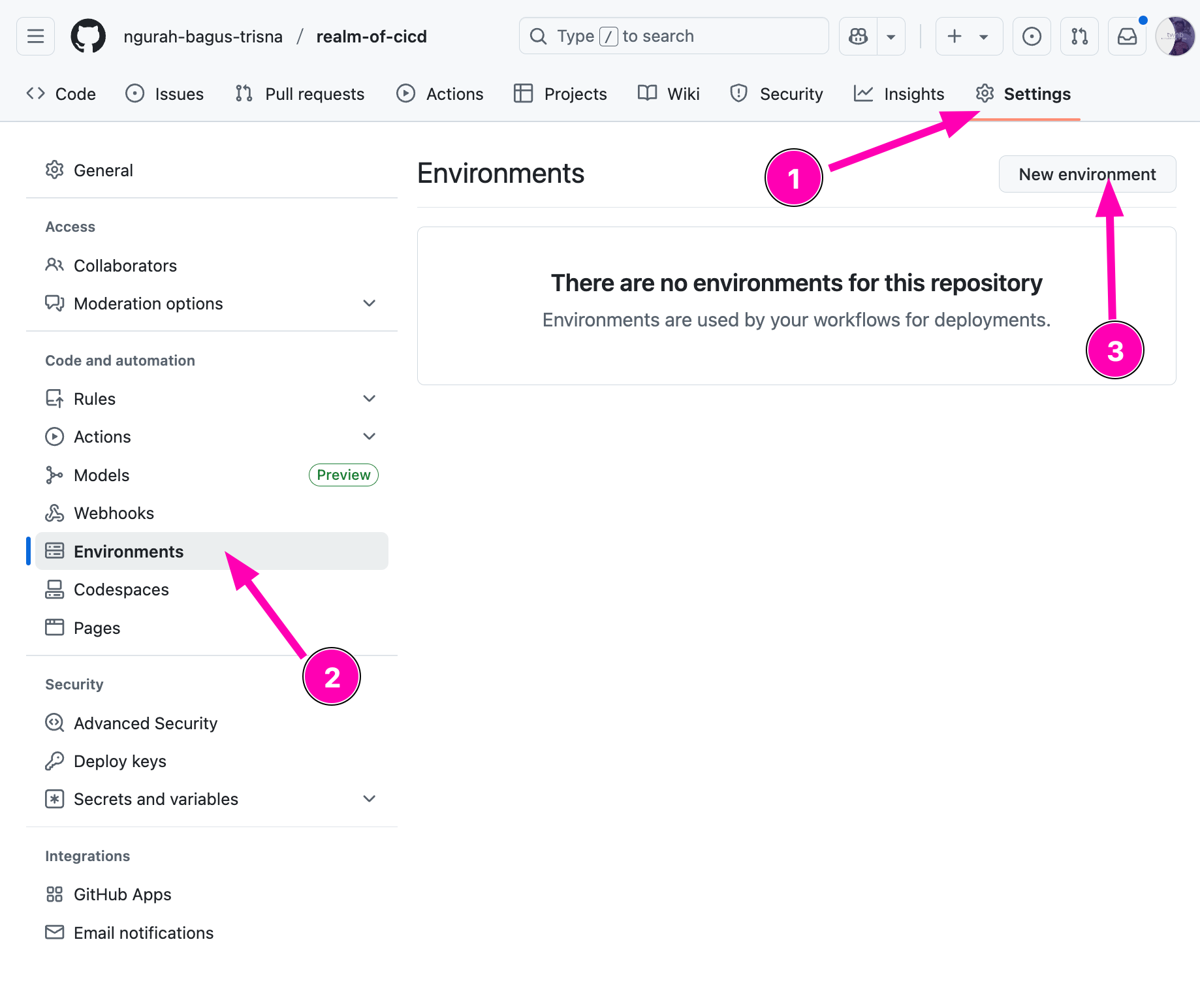
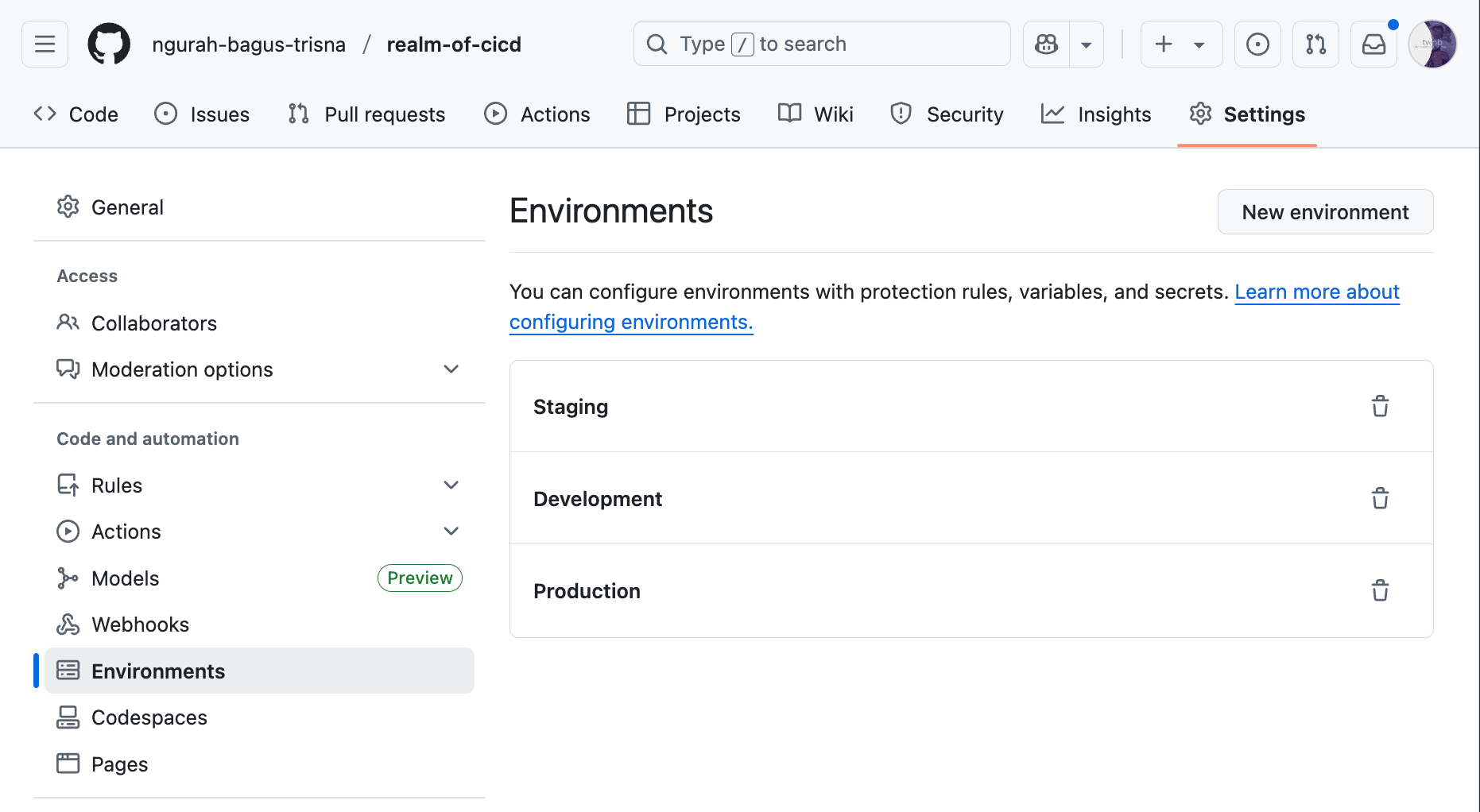
- Define three environments in repo Settings: dev, staging, production (Add required reviewers in production)
Create new repository first called realm-of-cicd, after that creating new environment by accesing Settings > Environment > New Environmet
Result
- Setup linter for
nodejs-apps
Reference :
npm init -y
npm install express

npm install --save-dev jest supertest
npx eslint --init
Create basic helloWorld node-js apps using express js.
const express = require('express')
const app = express()

app.get('/', (req, res) => {
  res.send('Hello World!')
})

module.exports = app;
const app = require('./index');
const port = 8080;

app.listen(port, () => {
  console.log(`Example app listening on port ${port}`);
});
Create test unit using jest
const request = require('supertest');
const app = require('../');

describe('GET /', () => {
  it('responds with hello message', async () => {
    const res = await request(app).get('/');
    expect(res.statusCode).toEqual(200);
    expect(res.text).toContain(`Hello World!`);
  });
});
Configure eslint.config.mjs for lint jest
import js from "@eslint/js";
import globals from "globals";
import { defineConfig } from "eslint/config";


export default defineConfig([
  {
    files: ["**/*.{js,mjs,cjs}"],
    plugins: { js },
    extends: ["js/recommended"]
  },
  {
    files: ["**/*.{js,mjs,cjs}"],
    languageOptions: {
      globals: globals.node
    }
  },
  {
    files: ["**/*.test.{js,mjs,cjs}"],
    languageOptions: {
      globals: globals.jest
    }
  }
]);
Configure package.json, add script for lint,test and dev
  "scripts": {
    "lint": "npx eslint .",
    "test": "jest",
    "dev": "node server.js"
  },
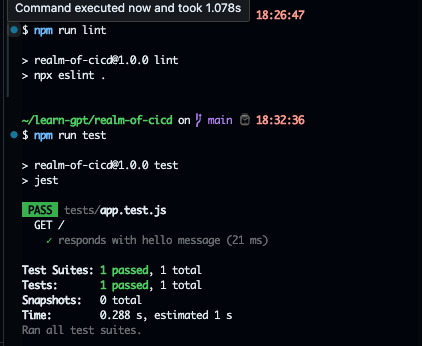
Try to run first in terminal, makesure all passed.
- In quest, need to plan
main.tfto createhello.txt.
Create main.tf
terraform {
  required_providers {
    local = {
      source  = "hashicorp/local"
      version = "~> 2.0"
    }
  }

  required_version = ">= 1.0"
}

provider "local" {
  # No configuration needed for local provider

}

resource "local_file" "hello_world" {
  content  = "Hello, OpenTofu!"
  filename = "${path.module}/test/hello.txt"

}
It will create a text file with the content
Hello, Opentofu!
Create terratest to makesure terraform can apply main.tf
package test

import (
	"testing"

	"github.com/gruntwork-io/terratest/modules/terraform"
	"github.com/stretchr/testify/assert"
	"os"
)

func TestHelloFile(t *testing.T) {
	// retryable errors in terraform testing.
	terraformOptions := terraform.WithDefaultRetryableErrors(t, &terraform.Options{
		TerraformDir: "../",
	})

	defer terraform.Destroy(t, terraformOptions)

	terraform.InitAndApply(t, terraformOptions)

	content, err := os.ReadFile("hello.txt")
	assert.NoError(t, err)
	assert.Contains(t, string(content), "Hello, OpenTofu!")
}
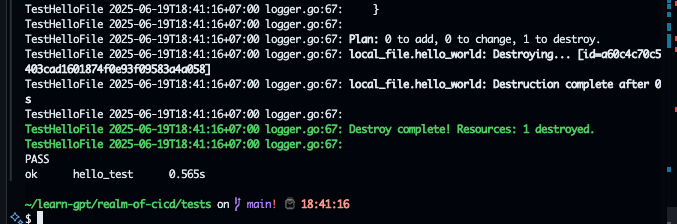
It will apply
main.tf, and destroy after the check finished
Init go modules & install modules
go mod init helo_test
go mod tidy

go test
- Create github workflows
.github/workflows/archon-ci.yml
name: Archon CI
on:
  push:
    branches: [main]
jobs:
  lint-test:
    strategy:
      matrix:
        language: [node, go]
        node-version: [20, 18]
        go-version: ["1.20", "1.21"]
    runs-on: ubuntu-latest
    steps:
      - name: Checkout repository
        uses: actions/checkout@v4

      - name: Setup Node.js
        if: matrix.language == 'node'
        uses: actions/setup-node@v2
        with:
          node-version: ${{ matrix.node-version }}

      - name: Run lint and unit tests on nodejs
        if: matrix.language == 'node'
        run: |
          npm install
          npm run lint
          npm run test

  IaC-apply:
    needs: lint-test
    runs-on: ubuntu-latest
    steps:
      - name: Checkout repository
        uses: actions/checkout@v4

      - name: Setup Terraform
        uses: hashicorp/setup-terraform@v3
        with:
          terraform_version: 1.7.1

      - name: Configure terraform plugin cache
        run: |
          echo "TF_PLUGIN_CACHE_DIR=$HOME/.terraform.d/plugin-cache" >>"$GITHUB_ENV"
          mkdir -p $HOME/.terraform.d/plugin-cache

      - name: Caching terraform providers
        uses: actions/cache@v4
        with:
          key: terraform-${{ runner.os }}-${{ hashFiles('**/.terraform.lock.hcl') }}
          path: |
            $HOME/.terraform.d/plugin-cache
          restore-keys: |
            terraform-${{ runner.os }}-

      - name: Apply terraform
        run: |
          terraform init
          terraform apply -auto-approve

      - name: Export to artifact
        uses: actions/upload-artifact@v4
        with:
          name: Output files
          path: |
            tests/hello.txt

  build-image:
    needs: lint-test
    runs-on: ubuntu-latest
    steps:
      - name: Checkout repository
        uses: actions/checkout@v4

      - name: Setup Docker Buildx
        uses: docker/setup-buildx-action@v3

      - name: Login to Docker Hub
        uses: docker/login-action@v2
        with:
          username: ${{ secrets.DOCKER_USERNAME }}
          password: ${{ secrets.DOCKER_PASSWORD }}

      - name: Build docker image with layer cache
        uses: docker/build-push-action@v4
        with:
          context: .
          push: true
          tags: ${{ secrets.DOCKER_USERNAME }}/archon-image:latest
          cache-from: type=gha
          cache-to: type=gha,mode=max

      - name: Pull image
        run: |
          docker pull ${{ secrets.DOCKER_USERNAME }}/archon-image:latest

      - name: Scan docker image
        uses: aquasecurity/[email protected]
        with:
          image-ref: ${{ secrets.DOCKER_USERNAME }}/archon-image:latest
          format: 'table'
          severity: CRITICAL,HIGH
          ignore-unfixed: true
          exit-code: 1

      - name: Push docker image sha
        run: |
          # Add your docker push commands here, e.g.:
          docker tag ${{ secrets.DOCKER_USERNAME }}/archon-image:latest ${{ secrets.DOCKER_USERNAME }}/archon-image:${{ github.sha }}
          docker push ${{ secrets.DOCKER_USERNAME }}/archon-image:${{ github.sha }}

  deploy-development:
    needs: [build-image, IaC-apply]
    uses: ./.github/workflows/deploy.yaml
    with:
      environment: Development

  deploy-staging:
    needs: [deploy-development]
    uses: ./.github/workflows/deploy.yaml
    with:
      environment: Staging

  deploy-production:
    needs: [deploy-staging]
    uses: ./.github/workflows/deploy.yaml
    with:
      environment: Production
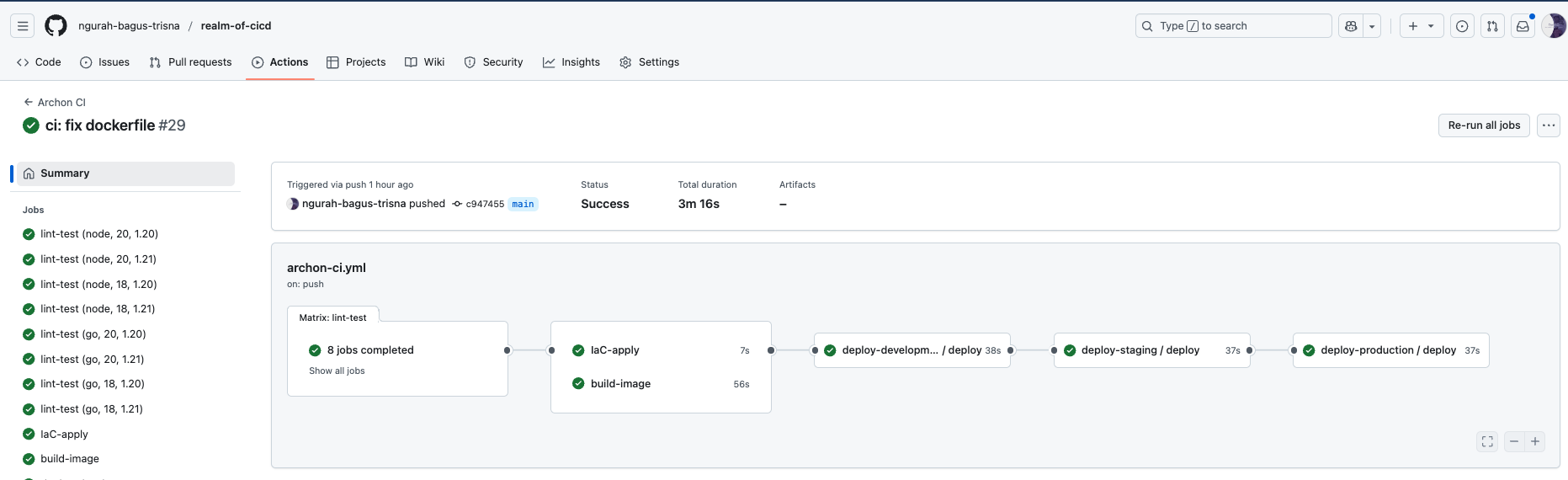
Explanation : This workflow automates linting, testing, infrastructure deployment, Docker image building, and multi-environment deployments using a matrix strategy and job dependencies.
Next create reusable workflow deploy.yml
name: Deploy Workflow
on:
  workflow_call:
    inputs:
      environment:
        description: 'The environment to deploy to'
        required: true
        type: string
jobs:
  deploy:
    runs-on: ubuntu-latest
    environment: ${{ inputs.environment }}
    steps:
    - name: Checkout repository
      uses: actions/checkout@v4

    - name: Deploy to ${{ inputs.environment }}
      run: |
        echo "Deploy to ${{ inputs.environment }}"
        docker run -d --name archon-${{ inputs.environment}} -p 8080:8080 ngurahbagustrisna/archon-image:latest

    - name: Wait for service to be ready
      run: |
        echo "Waiting for service to be ready"
        sleep 20  # Adjust the sleep time as necessary

    - name: Testing to hit using smoke tests on environment ${{ inputs.environment }}
      run: |
        echo "Running smoke tests"
        # Add your smoke test commands here, e.g.:
        chmod +x ./tests/smoke_test
        bash ./tests/smoke_test
        echo "Finished deploy to ${{ inputs.environment }}"
        docker rm -f archon-${{ inputs.environment}} || true
Push to github repository, and makesure all job passed.
Read more

Provisioning AWS Lambda dengan Terraform
Lanjutan belajar AWS: mengenal Lambda dan provisioning Lambda function di AWS menggunakan Terraform.

Provisioning EC2 dan RDS di AWS dengan Terraform
Catatan provisioning infrastruktur AWS pakai Terraform untuk EC2 dan RDS, mulai dari konfigurasi sampai hasil apply-nya.

AWS IAM Role, EC2 Instance Profile, dan Multi-Tier VPC
Bikin IAM role dan attach ke EC2 lewat instance profile, uji akses ke S3 dan SSM Parameter Store, lalu provisioning multi-tier VPC pakai OpenTofu.

AWS IAM Least-Privilege Policy dan VPC Networking Deep Dive
Menyusun IAM policy least-privilege dan IAM role di AWS, lalu lanjut ke networking VPC: subnet publik-privat sampai NAT Gateway.